What is a Podcast? A Brief History, How to Listen to Them, and How to Create Them
Posted on November 5, 2020 by 
Podcasting is big business these days. But it hasn’t always been. When the term first originated, and for many years afterward, very few people knew what it meant. And even if they did, knowing how to listen to one might not be in their skillset. Today, however, podcasts are simple to find, download, and consume. Plus it seems like everyone and their sister has a show of their own. We want to talk about how the format got to this point of mainstream saturation, and how you can take part in what is one of the biggest media shifts in the past couple of decades.
What is a Podcast?
First off, let’s define what a podcast is. That’s actually easier said than done. In the most technical sense, it’s an audio file that is downloaded to a device via an RSS feed. Contrasting with other digital audio, a podcast is usually talking or conversation rather than music. In many ways, a podcast is like talk radio on demand.
Podcasts as we know them started all the way back in 2004, when Adam Curry and Dave Winer designed a program called iPodder to download radio broadcasts to Apple iPods. And so the term podcasting was born, from iPod and broadcast. Makes sense, right?
For over a decade, podcasts were considered basically radio shows that you recorded and distributed to be listened to on iPods (or other MP3 players). Because of the original nature and ubiquity of iPods, when Apple introduced native support into iTunes for them, the format opened up beyond just the niches that already knew about it. Fast forward a little further, and Apple would eventually separate iTunes and podcasting, including a dedicated Podcasts app on iPhones, as well as creating an Apple Podcasts service for creators.
That’s when they started to hit the mainstream. People could just open their phones, click on Podcasts, and be given recommendations on where to start.
And at the same time all of this was happening, YouTube was growing, too, into the second largest search engine in the world, as well as one of the top media consumption sites on the internet. And despite being a video platform, people weren’t just consuming video content there. No, audio files were there for all the audiophiles out there.
Is YouTube a Podcasting Platform?
The question of “what is a podcast?” is actually very contentious right now among the podcasting community. Because, as we said, podcasting started and has grown via downloads from an RSS feed. And watching streamed videos on YouTube is certainly not that. But people say that they’re listening to podcasts when they are watching YouTube videos. But are they?
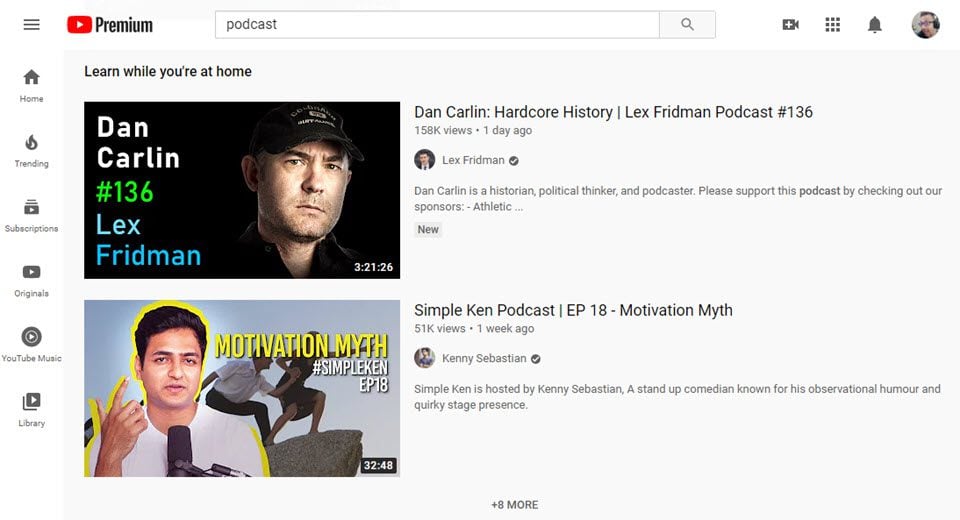
The line is blurring now. Between YouTube videos that stream the same podcast content that others are downloading on Apple Podcasts or Stitcher, what makes one a podcast and the other not?
Even platforms like Apple Podcasts are now moving more toward streaming, even though the original file is found via RSS. Then there’s the audio giant Spotify who has entered the podcast industry with a splash, and while they do pull podcast content from RSS feeds, they also pretty much entirely stream their content. Only a very small amount of Spotify listens are from fully downloaded content.
So What Is a Podcast, Then?
With all that in mind, the current idea of a podcast is a show that you listen to on the internet. It might be a session of Dungeons & Dragons from the folks at Critical Role, or maybe it is an interview between two industry experts on The Science of Social Media. Perhaps a true crime investigation docuseries like Serial. Regardless of whether you watch or listen on YouTube, Spotify, or Apple Podcasts, the content is the same. Podcasts, in their most basic form, are entertaining and informative audio shows.
How to Listen to Podcasts
As you might have noticed above, there are a number of ways to listen to podcasts. The vast majority of podcast listening happens on mobile devices because consumption can be passive. While driving or working out or cleaning the house. Podcasts can just play wherever you are. But there are more than a few places you can find podcasts. So many that it might seem overwhelming to pick one.
So this is our list of favorite apps and places to listen to podcasts, and they’re all available on mobile devices as well as on desktop.
- Spotify – Spotify has come a long way in its presentation of podcasts, and you even get personalized recommendations.
- Apple Podcasts – The grandparent of all podcast platforms, you can’t go wrong with the default Podcasts app on the iPhone.
- Google Podcasts – For Android users who can’t use Apple Podcasts, Google’s entry into the industry is solid and reliable. Depending on your phone’s manufacturer, you may or may not have this app by default.
- YouTube – As we mentioned above, YouTube is a major podcasting platform these days. Keep in mind, however, that YouTube requires a premium subscription to stream audio in the background, so it has to be the primary app running if you want podcasts and videos for free.
- Overcast.fm – While it is iOS only, Overcast is one of the most feature-rich podcast players out there. Especially when you consider it’s completely free.
- Pocket Casts – In terms of premium podcast apps, Pocket Casts is our favorite. The features and reliability are definitely worth the price, and it’s cross-platform.
How to Create and Publish a Podcast
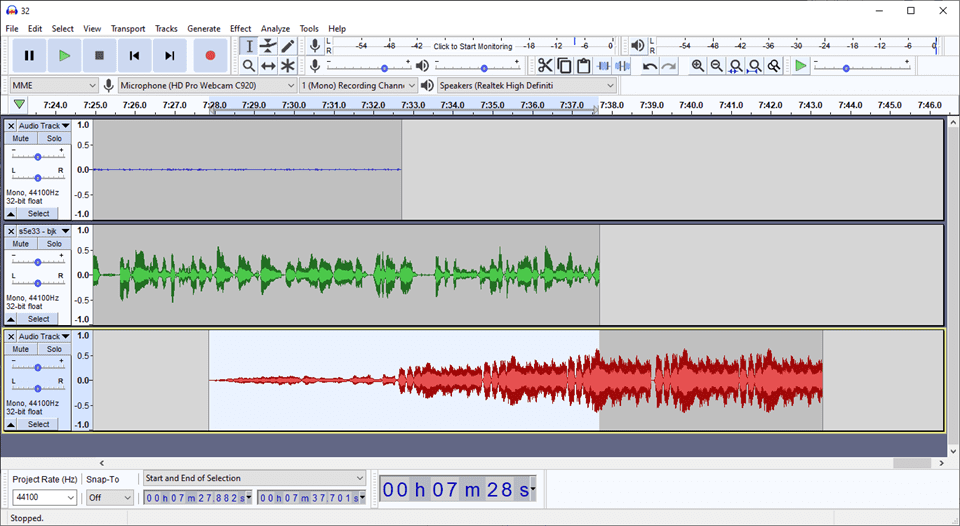
You’re probably thinking, “This sounds great. I want in on that!” Well, we’ve got you covered. Over the past few years, we’ve noticed the steady increase in podcasting interest, and we’ve got a large archive of posts to get you started. Whether you want to become better at editing shows you’ve already recorded, record remote guests, or to distribute your podcast to Apple Podcasts to get it started, we have something for you.
If you’re in search of the right podcast host, we have lots of posts for you to pore over.
- Anchor.fm
- Podbean
- Buzzsprout
- Seriously Simple Podcasting and Castos
- SoundCloud
- Libsyn
- WordPress and PowerPress
Additionally, if you need to know about tools to create podcasts, we’ve got you covered there, too. From concept to publication, we have put together some great pieces on software that you can use, how to choose topics, how to name your podcast, and even a step-by-step guide to getting your first sponsorships.
- Underrated and unknown podcast software you should be using
- The top audio editing software
- Using Zencastr for remote podcast recording
- How to create podcast cover art
- Ideas for podcast monetization
- How to get sponsorships for your podcast
- Using Spotify for Podcasters
- How to choose the right podcast niche
We even put together lists of podcasts to inspire you, no matter what your topic or industry is.
- For bloggers and content creators
- Freelancers and the self-employed
- Social media marketers
- Managers, supervisors, and thought-leaders
And if that weren’t enough, our Divi resources for podcasters are pretty solid, if we do say so ourselves.
- Divi child themes for podcasters
- Podcast website layout pack
- Audio module styling
- Divi podcast home page tutorial
- Divi Podcast archives and show notes tutorial
- Adding a Latest Episode audio bar to Divi
- Using Divi for a streaming radio station
Basically, if there’s a topic that you need to know about regarding, we probably have it. And if we don’t, let us know, and there’s a good chance that we can wrangle it up for you.
Wrapping Up
Podcasting is going nowhere. If anything, the industry is only going to get bigger and bigger. And we want to make sure that you don’t miss out on riding the wave. So whether you are at the “what is a podcast?” stage or need some in-depth help on editing your podcast, submitting your podcast, or recording with guests, we think we’ve got something for you. Just remember, podcasting is constantly evolving, and what started in 2004 as a niche kind of media no one had heard of is now a billion-dollar industry. We can’t wait to see what is coming up for podcasts in the future.